Plan a construction project on a timeline
Lots, phases, Aufträge and Rapporte on one timeline — and underneath, how full your weeks already are.
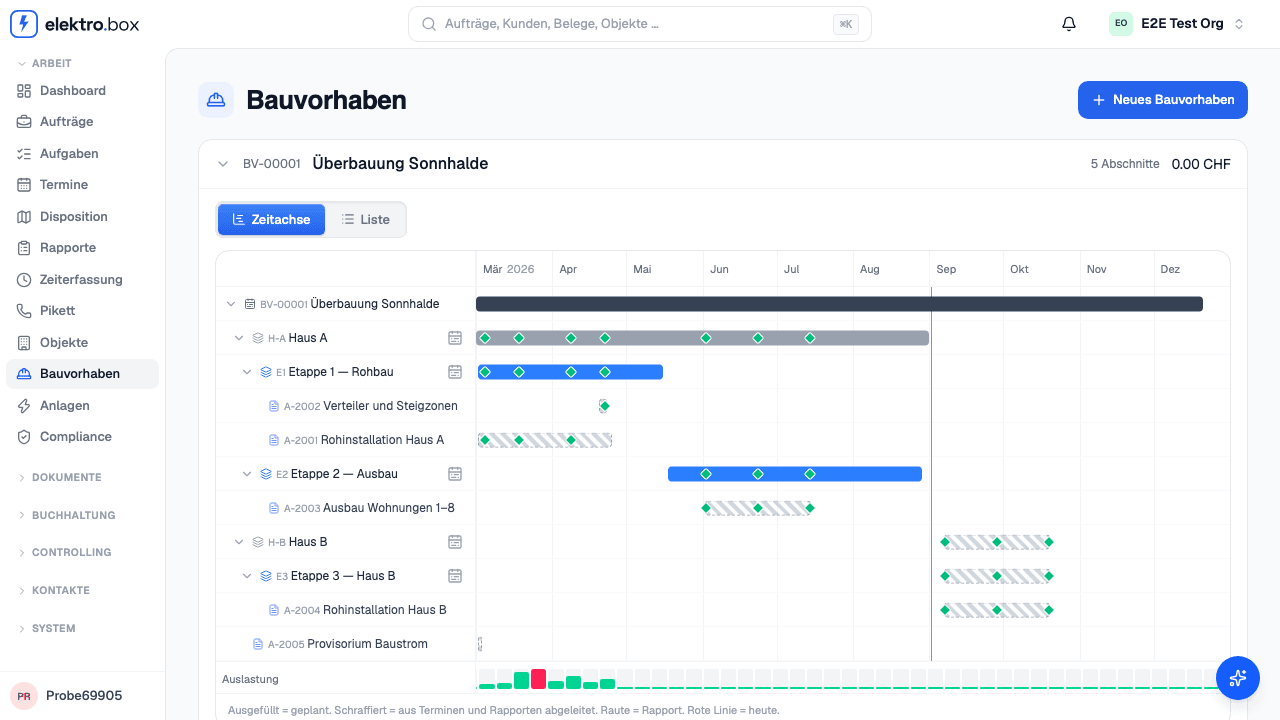
A construction project used to be a list: lots, phases, Aufträge — with no dates. Nothing said when a phase runs. Under «Bauvorhaben» there is now a timeline. Every phase is a bar you drag, or resize by its edge; on a phone you set start and end in two date fields. The Aufträge hang beneath it, and every Rapport sits as a diamond on the day the work happened.
A solid bar is planned — what you committed to. A hatched bar is inferred: it shows where an Auftrag's appointments and Rapporte actually fall. So you can see at a glance which phase is already running without ever having been planned.
At the foot, a strip shows how full each week is across the whole firm — every Auftrag, not just this project, less holiday and absence. Green means room, red means over-booked. You can see which week you are putting a phase into before you put it there. The strip is for owners, the office and the trustee; it does not appear on a fitter's device.